 Talk
Home → Talk → Turn a recording into a captioned video
How to turn a recording into a video with captions on iPhone
Reels, TikTok and Shorts take video, not audio, so a podcast clip, a voice memo or a voice note goes up as a vertical video with its words as captions, which carry it for people watching with the sound off. In Talk, which is free and adds no watermark, open the recording, cut it to the moment by its transcript, and tap Captioned Clip to see it as a 9:16 video: its captions over black, or over a photo or title you place on it. Export a Captioned Clip makes the video, from Talk 2.9.
The steps in Talk
- Open the recording Share it to Talk from Voice Memos, Files or a WhatsApp chat, or on Talk’s projects screen tap + and Import Audio, or Record Audio to record it there. It opens as an audio project, with the recording’s transcript where a video would be.
- Cut it to the moment The video is the whole recording as edited, so cut it to what you want to post. Tap Transcribe, then in Smart Edit tap Select to Cut and cut the lines before and after it, or ask: “keep only the part about the trip”. To keep the full recording too, first touch and hold the project on the projects screen, tap Duplicate…, and cut the copy.
- See the video Tap Captioned Clip over the transcript. The recording’s words play as captions on a vertical 9:16 frame, over black; tap Transcript to go back.
- Style the captions and dress the frame Open Captions to pick a style, and drag, pinch or twist the captions to place them; Clear of App Buttons keeps them above the buttons Reels, TikTok and Shorts draw over a video. From Overlays, put a title or a photo, such as the show’s cover, on the frame.
- Export the video Tap Export, then Export a Captioned Clip, which runs the video export: a 1080 × 1920 video with the captions burned in, saved to Photos, with Share beside it.
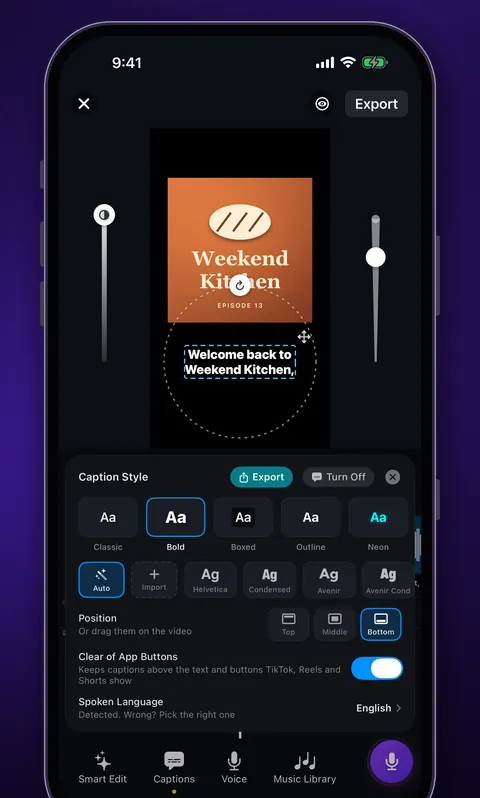
What the video holds
| Picture | The captions, and any text or photo placed on the frame, over black. No moving waveform. |
|---|---|
| Size | 1080 × 1920, vertical, the size Reels, TikTok and Shorts recommend. |
| Sound | The project’s sound as the editor plays it: the recording as cut, and any music under it. |
| Captions | The transcript’s words, timed to the speech and burned into the picture, in any caption style; five styles are free, the rest are Pro. |
| Cost | Free, with no watermark. |
The audio file and the video come from the same project, so a podcast can go out as its episode, an MP3, and as clips: export the episode first, then duplicate the project for each clip. Editing the episode.
Frequently asked questions
How do I turn a podcast into a video for Instagram Reels or TikTok?
Cut the episode to a short moment, caption it and export it as a vertical video. In Talk, free from version 2.9, import the episode, cut it to the moment by its transcript, tap Captioned Clip to see it as a 9:16 video with captions, and export it with Export a Captioned Clip. It has no watermark.
Can I add captions to an audio recording on iPhone?
Yes, by making it a video: a recording has no picture to put captions on. Talk transcribes the recording on the phone and shows its words as captions on a vertical frame, which it exports as a video with the captions burned in. For the words alone, export them as an SRT or text file from Transcript & Subtitles. Exporting the words.
Does the video show a moving waveform?
No. Talk’s captioned clip shows the captions, and any text or photo you place on it, over black. The captions follow the words as they are said, which is what keeps people watching with the sound off.
Can I add my podcast cover or a title?
Yes. In the audio project, add a photo or text from Overlays and place it on the vertical frame; the captioned clip shows it under or around the captions, and the export keeps it.
Can I put music under it?
Yes. Talk’s music library is licensed for videos made in Talk and posted on social media, which a captioned clip is, and the prompt bar can lower the music whenever someone talks. The export carries the project’s sound as you hear it in the editor.