 TalkAI Video Editor & Maker for iPhone and iPad
Edit your videos just by talking.
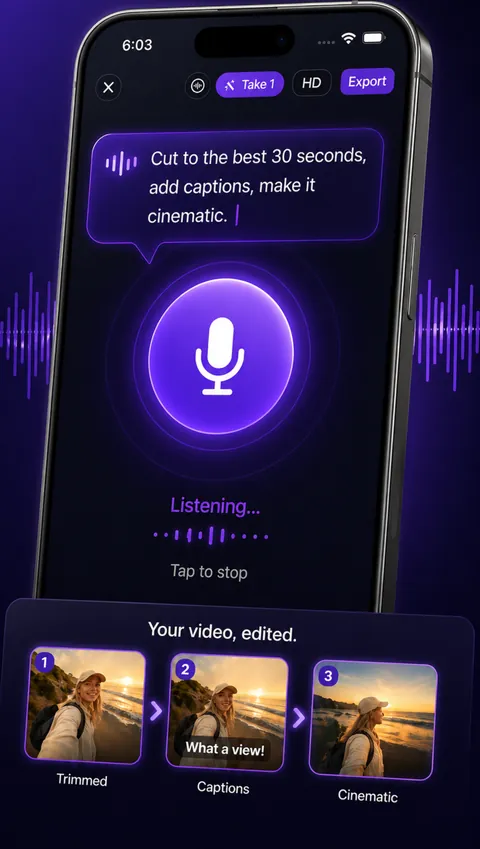
Say “remove the silences and add captions in red”, or type it, and Talk edits the video on your iPhone or iPad.

- Free to download
- No watermark
- No account needed
- iOS 17.0 or later
How it works
Say it, or type it, and it happens
The prompt bar is the main control, with 80+ AI editing actions behind it. Hold the mic and speak, or type as you would in a chat: one sentence does what would take several trips through a menu.
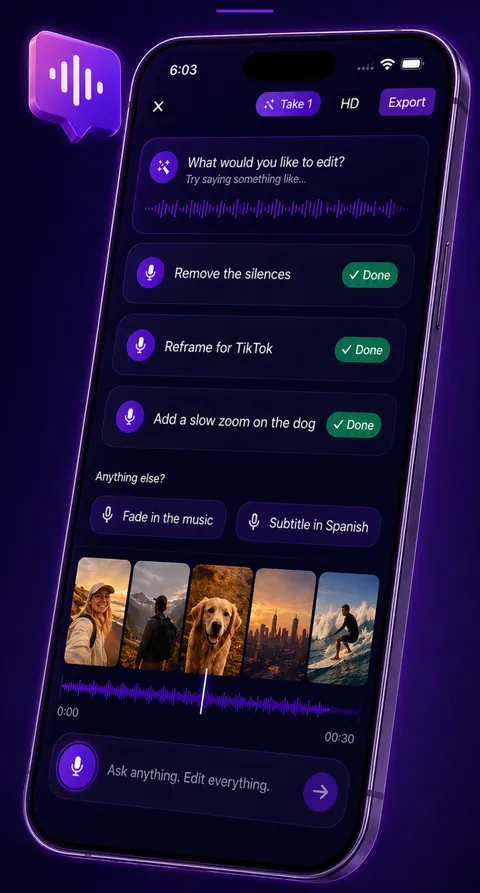
- Remove the silences
- Cut the retakes
- Add captions in red
- Start with the shot of the dog
- Sync the cuts to the beat
- Make it cinematic
- A travel vlog edit
- A wedding highlight reel
- Blur his face
- Make the captions bigger and move them to the top
Import your footage
From the camera roll, the Files app or a direct video link. Still photos can be turned into clips.
Say or type what you want
“Cut the dead air, add captions, and put a beat-synced music bed under it.” Talk turns the sentence into separate edits and applies them in order. It knows what is in your clips and who speaks when, so “start with the shot of the dog” or “cut everything the person on the left says” works too. Hold the mic and it listens in the language your phone is set to, or type it as you would in a chat.
Correct by talking again
“Make the captions bigger and move them to the top.” Each one is a normal timeline edit, so undo works the way you expect.
Export with no watermark
Up to 1080p on the free tier, and 4K, 2K or HDR at up to 60 fps on Talk Pro.
Teleprompter and recordings
Read a script to the camera, or edit a recording
The same cuts, wherever you start: Talk finds the retakes, ums and long pauses in a take read from its teleprompter, or in a podcast recorded anywhere.
A free teleprompter that cuts your take
The script scrolls by the lens as you speak and waits when you pause. When you stop, Talk keeps the best take of each line, cuts the retakes and stumbles, and shortens the long pauses. No script yet? AI writes one from what the video is about.
Record with a teleprompter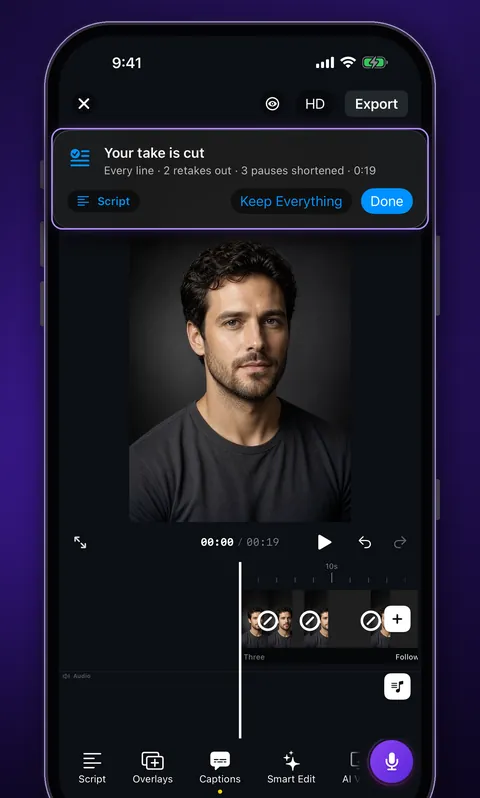
Podcasts and voice memos, edited by their words
Open a podcast, a voice memo or a WhatsApp voice note, and Talk transcribes it on your phone. Ask for the ums, pauses and retakes to go, or tap words in the transcript to cut them, then export an MP3, M4A or WAV at an even volume, or a captioned video for Reels and TikTok.
Edit a podcast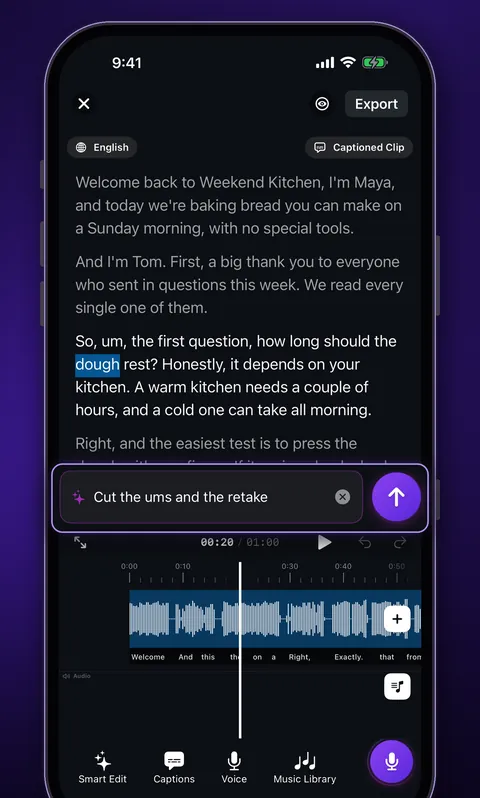
Why Talk
What a talking video needs, done for you
The jobs that eat an evening on a timeline, each one sentence or one tap, and a full editor underneath for the rest.
Captions in 31 languages
Transcribed on your phone and set in one of 21 styles, 5 of them free. Fix any word before you export.
Add subtitlesPauses, ums and retakes, cut for you
Dead air and filler words are found on the device and cut with every sentence kept, and Remove Retakes keeps the take you finished.
Remove silences and umsOn the beat, in one tap
Music Sync puts your cuts on the beat without re-cutting them, or re-cuts a reel to the song. Best Moments finds the highlights, and Quick Recap makes 30 seconds of your day.
Sync cuts to the beatA real timeline underneath
Trim, split, crop, speed, keyframes, 62 filters, 41 effects and 19 transitions. Every AI edit is one you can take over by hand.
Everything in the editorProcessed on your phone
Captions, silence removal, face blur and export run on the device and work offline, captions after a one-time model download. What you type or say reaches OpenAI as text, with a written description of what is in your clips and low-resolution stills for some requests, and AI Video sends only the photos and clips you pick.
What is sent, and how to checkFree, with no watermark
Export at up to 1080p with no account and no time limit. Talk Pro adds 4K and HDR, unlimited AI actions and AI Video.
Compare Free and ProTalk Pro
AI Video: the shots you never filmed
Bring a photo to life, carry a shot on past its last frame, or change what happens in your footage. Start from 30+ templates or a sentence, and the clip lands on your timeline.





Six of the templates, made by Talk from AI-made sample photos.
Seven ways to use it
- From a sentence. Describe the clip, and it comes in your project’s shape.
- Templates. 30+ looks, effects and camera moves, made from your photo.
- Animate a photo. Or the frame of your video at the playhead.
- Make someone move. The person in a photo copies the moves from a video.
- Extend a clip. More seconds, carried on from its last frame.
- Edit footage. Describe the change, and the sound is kept.
- Change the setting. The people stay, and the place around them changes.
Or ask for one in the prompt bar:
Generate a video of waves crashing on rocks at sunset
Paid in video credits
Each video shows its price before you make it. For 5 seconds at 720p:
- From a sentence or a photo
- 7
- A template
- 4–7
- Make someone move
- 8
- Edit footage or change its setting
- 13
- Extend a 5-second clip by 5 seconds
- 13
A video the service fails to make costs nothing. One it makes that isn’t what you hoped for is charged, since the service has made it.
Every Talk Pro plan includes credits, and packs add more: plans and packs.
Only the words, photos and clips you choose for a video are sent, to make it on a server.
Pricing
Free, and then optional
The free tier is meant to be used, not demoed: no watermark, no time limit, and no account to make.
Talk
$0to download
No time limit, and no watermark on any export.
- Prompt editing, 3 AI actions a day
- The teleprompter, with each take cut to the script
- One-tap Vibes, rhythm templates and the music library
- Auto-captions in 31 languages, in 5 of the 21 styles
- Silence, filler-word and retake removal, scene detection, face blur and Tap to Blur
- Stock footage and AI B-roll
- Crop, voice-over, camera reactions, basic transitions and filters
- 1080p export, never watermarked
An AI action is one prompt-bar request or Vibe, or one translation, summary, Smart Cut or set of B-roll suggestions. Captions, silence removal and editing by hand don’t use any. The 3 come back each day.
Get Talk — freeTalk Pro
Weekly
$7.99
per week
30 video credits a week
Monthly
$14.99
per month
60 video credits a month
Most credits for the price
Yearly
$69.99
per year
15 video credits a month
Lowest price
Yearly works out at $5.83 a month, the cheapest way to edit with Pro; monthly includes the most video credits for its price. Each plan’s credits follow what it pays per month, refill each week or month, and don’t carry over. A 5-second AI video from a sentence or a photo is 7 credits.
Everything in the free tier, plus:
- AI Video, with video credits in every plan
- Unlimited AI actions
- 4K, 2K and HDR export at up to 60 fps
- The full filter, effect, transition and caption-style libraries
- AI images and AI-generated backgrounds
- Auto-reframe that follows whoever is speaking, with split screen for two people
- Chroma key, motion tracking, person segmentation
- Subject lift, shape, luminance and keyframed masks
- Voice isolation and AI dubbing
- iCloud Sync, and library search by what is in each photo and video
More video credits: 30 for $4.99, 70 for $9.99, 140 for $17.99. One-time purchases for Pro subscribers. Bought credits never expire, are spent after a plan’s, and stay usable after Pro ends.
Start free, upgrade in the appUS App Store prices; they may differ by territory. Talk Pro is an auto-renewing subscription billed through your Apple ID, and you can cancel any time in Apple ID settings. See the terms of service and privacy policy.
Stop tapping. Start talking.
Free on the App Store for iPhone and iPad, with no watermark on any export.
Get Talk — freeiOS 17.0 or later