 Talk
How to edit a podcast on iPhone
Edit it by its words. In Talk, which is free, record the episode or import the file, and it opens on its transcript, not on a bare waveform. Smart Edit cuts the ums, the long pauses and the lines you broke off and said again, or you ask for it in a sentence; you cut whole passages by tapping their lines. Export then evens out the volume to −16 LUFS, the level Apple Podcasts recommends, and saves an MP3, M4A or WAV. All of it runs on the iPhone, from Talk 2.9.
The steps in Talk
- Bring in the recording On the projects screen, tap +, then Record Audio to record the episode in Talk, which keeps recording with the phone locked or another app open; Import Audio for a file (M4A, MP3, WAV, FLAC and the like); or Audio from a Video for the sound of a video, such as a recorded video call. A file in Files or Voice Memos can also be shared to Talk. It opens as an audio project: the transcript stands where a video would, over the recording’s waveform.
- Transcribe it Tap Transcribe. Talk transcribes on the device and lights each word as it is said, and a tap on a word goes to it. If it heard the wrong language, pick the right one and it transcribes again.
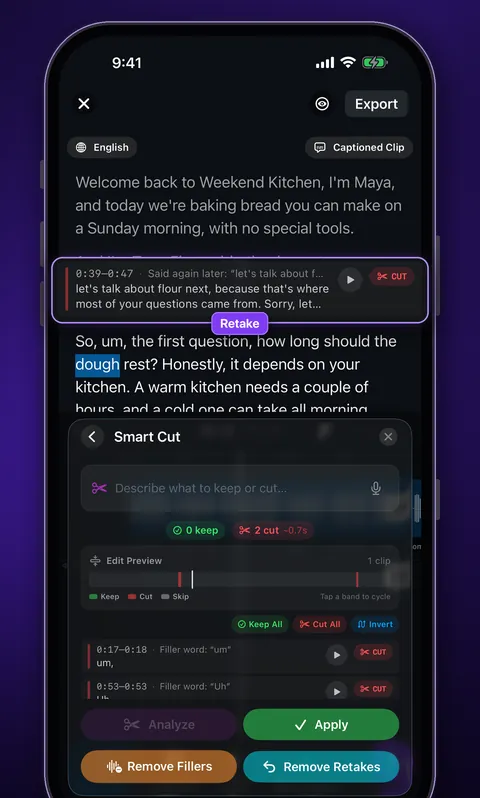
- Cut the ums, pauses and retakes Tap Smart Edit. Smart Cut has Remove Fillers, which lists every um, uh, er and hmm with its time so you can keep any that sound natural, and Remove Retakes, which cuts a line you broke off and said again and keeps the take you finished. Trim Silence shortens the pauses. Or type or say it in the prompt bar: “cut the ums and the long pauses”.
- Cut whole passages by their words In Smart Edit, Transcript & Captions, tap Select to Cut, tap the lines you don’t want, then Cut; it is one step to undo. Or ask: “remove the intro”, “cut the part about the sponsor”. Editing by the transcript.
- Clean the sound Isolate Voice, on Talk Pro, strips room noise from the speech, on the device. Talk’s music library is licensed for videos made in Talk and posted on social media, so keep its tracks for a captioned clip of the episode, not the episode you publish to podcast apps.
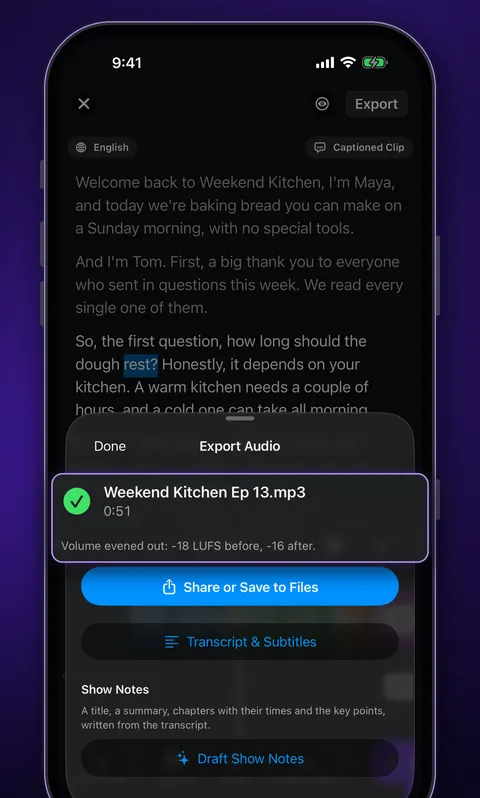
- Export the episode Tap Export and choose a format, leave Even Out Volume on, then Share or Save to Files. Draft Show Notes, on the same screen, writes the episode’s notes from its transcript, and Export a Captioned Clip makes a vertical video of it with captions for Reels, TikTok and Shorts.
What the export gives you
| MP3 | 128 kbps for a mono recording, 192 kbps for stereo, at a constant rate, so players show the right length. Every player and podcast host takes it. |
|---|---|
| M4A | AAC at the same rates, which Apple Podcasts, Spotify and most podcast hosts take. |
| WAV | Uncompressed 16-bit audio, to keep as a master or finish elsewhere. |
| Even Out Volume | On by default: quiet and loud stretches brought to one level, a softly spoken guest included, then the whole episode to −16 LUFS with true peaks under −1 dB. The screen shows the loudness before and after. |
| Show notes | A title, a summary, chapters with their times and the key points, drafted from the transcript to copy or share. Check names and facts before you post them. Each draft is one of the free tier’s 3 AI actions a day. |
The file holds the episode as you edited it: a cut passage is gone, and the music sits where you put it. The project keeps everything, so you can come back, change a cut and export again.
How loud a podcast should be
Apple Podcasts recommends an overall loudness of −16 LKFS, give or take 1 dB, with true peaks no higher than −1 dBFS; LKFS and LUFS are the same scale. A phone recording is usually quieter than that, and a guest on the far side of the table quieter again. Raising the whole file lifts both by the same amount, so the guest stays quiet; Even Out Volume levels them against each other first, a few seconds at a time, and keeps the pauses at the level of the speech beside them, so the room doesn’t rise when nobody talks.
Ways to edit a podcast on iPhone
| App | How you edit | What you get | Cost |
|---|---|---|---|
| Talk | On the transcript: ums, pauses and retakes found for you, passages cut by their lines or by asking | MP3, M4A or WAV at −16 LUFS, show notes, a captioned clip | Free, no watermark; Isolate Voice on Pro |
| GarageBand | On a waveform, with several tracks for voices, music and effects | WAV, AIFF or compressed audio, or a ringtone | Free, from Apple |
| Voice Memos | Its own recordings: trim the ends, delete a selection, or record over part | The recording, edited in place or saved as a new one | Built in |
As of 12 November 2026, from Apple Podcasts for Creators (Audio requirements), the GarageBand for iPhone User Guide (Share songs) and the iPhone User Guide (Edit or delete a recording in Voice Memos).
Frequently asked questions
What’s a good app to edit a podcast on iPhone?
One that edits by the transcript, cuts filler words and evens out the volume. Talk, which is free, does all three on the iPhone from version 2.9: record or import the episode, cut the ums, pauses and retakes in Smart Edit or by asking, and export an MP3, M4A or WAV at −16 LUFS, the level Apple Podcasts recommends. GarageBand, free from Apple, edits several tracks on a waveform, with no transcript, and shares WAV, AIFF or compressed audio rather than MP3.
How do I cut the ums out of a podcast on iPhone?
Transcribe the episode in Talk, then tap Smart Edit, Smart Cut and Remove Fillers, or type “remove the ums” in the prompt bar. Every um, uh, er and hmm is listed with its time, and you keep any that sound natural. Remove Retakes beside it cuts the lines you broke off and started again. Both run on the device and are free. How the detection works.
Can I export a podcast as an MP3 on iPhone?
Yes. From Talk 2.9, an audio project’s Export offers MP3 at a constant 128 kbps for mono or 192 kbps for stereo, which every player and podcast host takes, beside M4A (AAC) and WAV. Then Share or Save to Files sends it to a podcast host’s app, Files or AirDrop.
How loud should a podcast be?
Apple Podcasts recommends an overall loudness of −16 LKFS, give or take 1 dB, with true peaks no higher than −1 dBFS. LKFS and LUFS are the same scale. Talk’s Even Out Volume brings an episode there as it exports, and evens out a quiet guest against a louder host on the way, which a single volume change can’t do.
Is my recording uploaded to edit it?
No. Talk records, transcribes, cuts and levels the episode on the iPhone, and the audio stays there. Its language-model features send text, never the audio: a prompt-bar request goes with a text description of the project, show notes and translation send the transcript, and a new transcript is sent once, when you are online, to fix its punctuation. What each feature sends.