 Talk
How to record a video with a teleprompter on iPhone
Use a teleprompter that records: it shows your script just under the front camera’s lens while you film yourself reading it. In Talk, a free video editor, tap + and Record with Teleprompter, paste your script or have AI write one, and read: the script moves as you speak and waits when you pause. When you stop, Talk cuts the take to your script, keeping each line’s best take and dropping the retakes, the ums and the long pauses, on the iPhone. The teleprompter is in Talk from version 3.0, free, with no watermark.
The steps
- Open the teleprompter Tap + on the projects screen, then Record with Teleprompter. In a project you are editing, it is in Add Media, and the take goes at the end of the video. You can also type “open the teleprompter” in the prompt bar.
- Write or paste the script Type or paste what you will say. A blank line starts a new section, and notes in [brackets] show on screen but aren’t read. Talk shows how long the script takes to read, at a typical pace at first and then at yours. No script yet? Tap Write a Script with AI (below).
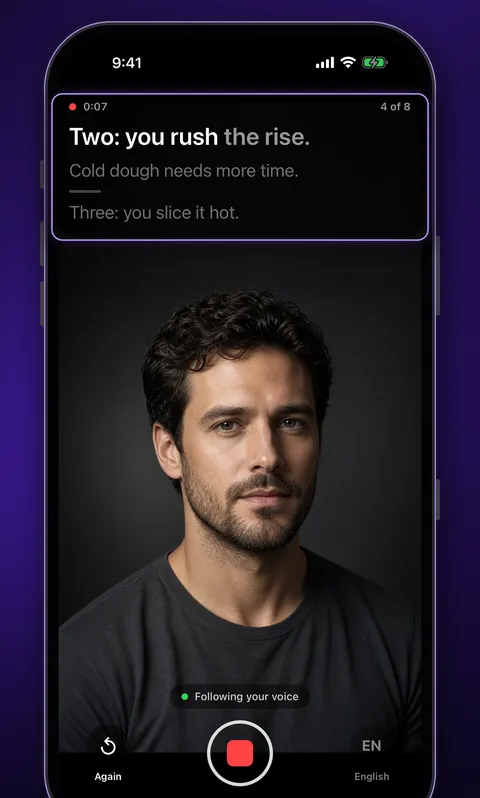
- Read it to the camera Tap Read It and pick the video’s shape: 9:16, 4:5 or 1:1 on an iPhone, 16:9 or 1:1 on an iPad held sideways. After a three-second countdown, the script shows three lines at a time just under the lens, moves as you read and waits when you pause. Stumbled? Tap Again and start the line over; the cut leaves out what you read of it.
- Review the take Talk plays it back with captions, spelled as your script is, and a coach card (below). Tap Retake to throw it away, or Use Take.
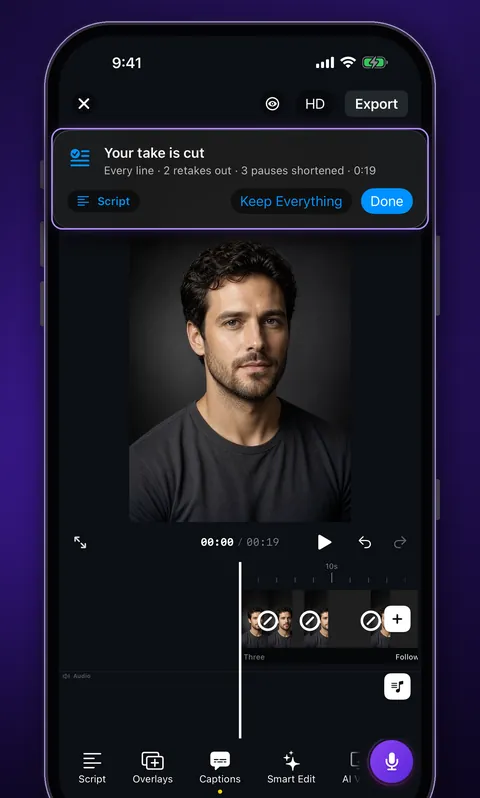
- Let Talk cut it to the script Talk transcribes the take on the iPhone and keeps each line’s best take. Lines you broke off and read again go, the ums inside a line go, a pause of over 1.2 seconds inside a line becomes half a second, and the gaps between lines are tightened. A card says what it did, such as “12 of 14 lines · 3 retakes out · 2 pauses shortened”. Keep Everything puts the take back as recorded, and Undo puts the cut back.
- Record any line you missed The lines the video doesn’t have yet are listed under Not in your video yet. Record It reads just those, or Continue Recording all of them, over a faint image of your earlier take so you can sit where you sat; each goes where it belongs in the video. Opening the project later, the top bar offers Continue for as long as a line is missing.
Write the script with AI
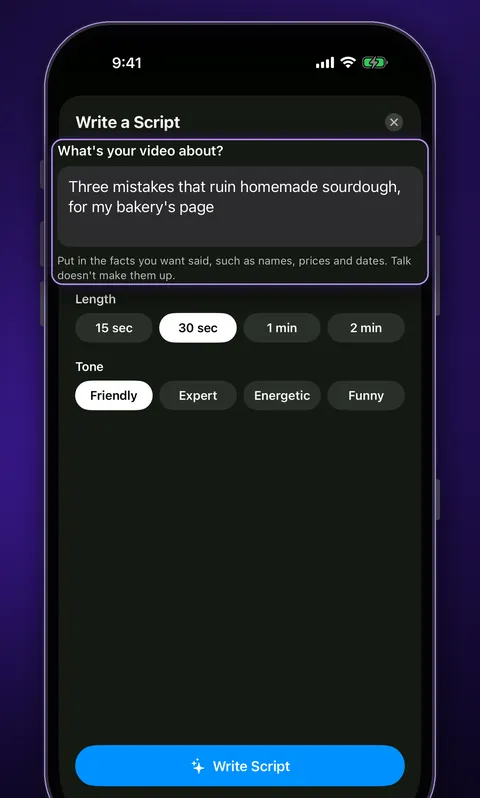
Under the script, Write a Script with AI asks what the video is about, how long it should be (15 seconds, 30 seconds, 1 or 2 minutes, at your reading pace) and its tone: Friendly, Expert, Energetic or Funny. Put in the facts you want said, such as names, prices and dates, because Talk doesn’t make them up. Once there is a script, three more tools work on it: Shorten (to a length you pick), Sharpen Hook (a stronger opening line) and Translate (as a native speaker would say it, at about the same length). Undo puts back the script as it was.
Each is one AI action, of which the free tier has 3 a day; Talk Pro has no limit. A script written elsewhere, in Notes or by ChatGPT, can be shared to Talk from that app’s share sheet, and opens in the teleprompter. Scripts you haven’t recorded yet wait in Scripts.
What the coach card measures
| Pace | Words a minute, against your usual pace once Talk has learned it, or against a typical read on your first take. |
|---|---|
| Fillers | The ums and uhs you said that aren’t in the script. Talk cuts them. |
| Eyes | How much of the take you faced the camera, read from the frames as they were recorded. The script sits just under the lens, so reading it counts as facing the camera. |
| Sound | Whether your voice is loud and clear enough, too quiet, or so loud it distorts. |
One tip follows, for what most needs fixing: speak up, look up, or slow down a little, since Talk trims the long pauses for you. All of it is measured on the iPhone.
Pick takes line by line
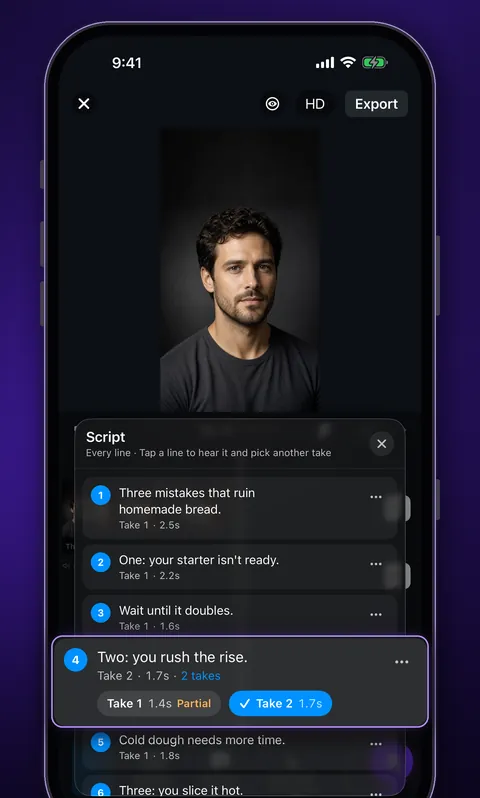
Script, in the editor’s toolbar, lists the script’s lines with the take each one uses. Tap a line to hear it; a line you read more than once lists its takes, and a tap puts another in the video. A line’s menu moves it up or down, cuts it from the video or puts it back, and Record Missing reads the lines the video lacks.
Two kinds of note in the script do more than remind you. A cue such as
[b-roll: the beach] becomes a row in Add Cutaways, where you
pick footage for it: your own photos and videos, free stock, or on Talk
Pro an AI image or an
AI video made from the
cue’s words. And each section of the script becomes a chapter, which Copy
Chapters copies as “0:00 Intro” lines for a YouTube description.
More on cutaways.
Languages
Talk detects the script’s language from its words, and a tap on the language changes it. The script follows your voice through Apple’s speech recognition, on the iPhone, in the languages it recognises there; on iOS 26 Talk offers to download a language your iPhone lacks. Otherwise the script moves at your pace, which Talk learns as you read. The take is transcribed and cut in the script’s language; the first cut on a phone downloads Talk’s speech model, once.
Teleprompter apps for iPhone
| App | Follows your voice | Cuts your take | AI scripts | Price |
|---|---|---|---|---|
| Talk | Yes, on the device | Yes: each line’s best take, retakes and long pauses out | Yes; each tool is one of the free tier’s 3 AI actions a day | Free, no watermark; Pro optional; iOS 17 or later |
| Cuefold | Yes (Voice Follow), on the device | Yes (Clean Cut): the last good read of each line | With Pro, on devices with Apple Intelligence | Free exports carry a watermark; $2.99 for one without, or Pro $5.99 a month or $49.99 a year; iOS 26 or later |
| PromptSmart+ | Yes (VoiceTrack), in 15 languages, on the device | Not stated in its listing | Not stated in its listing | Free to download; VoiceTrack needs PromptSmart+, $8.99 a month or $79.99 a year |
| BIGVU | Yes (Voice Control) | Not on its teleprompter page | Yes (AI Script Generator) | Free plan exports 720p with a watermark; Starter $12 a month on its website |
| Teleprompter.com | Yes (VoiceGlide) | Not stated; its listing names trimming | Rephrases tricky lines with AI | Pro from $89.99 a year, with a 7-day free trial |
| CapCut | Scrolls at a speed you set | Not stated; the clip opens in its editor to trim | Improve, Expand and Shorten | Free |
Where the others do more: Cuefold and Teleprompter.com also record with the back camera (Cuefold in 4K), mirror the script for a glass teleprompter rig and take a Bluetooth remote, and Cuefold makes its Clean Cut from a video you already filmed. Talk’s teleprompter records with the front camera, at up to 1080p, and cuts the takes made in it; what it adds is the rest of an editor around them, with captions, B-roll and music, and no watermark on the free tier.
The third-party rows were checked against each vendor’s own pages on 25 November 2026. “Not stated” means the page doesn’t say either way, not that the app lacks it. Prices are US prices and change; check the current App Store listing.
Sources: Cuefold on the App Store, Cuefold’s Clean Cut, PromptSmart+ on the App Store, Teleprompter.com on the App Store, BIGVU’s mobile teleprompter, BIGVU’s prices, CapCut’s teleprompter, CapCut help.
Frequently asked questions
Is there a free teleprompter app for iPhone that follows your voice?
Yes. Talk, a free video editor, has a teleprompter from version 3.0: the script moves while you read and waits when you pause, using Apple’s speech recognition on the iPhone. It records with the front camera, and the video has no watermark. PromptSmart+ also follows your voice, with a subscription; CapCut’s teleprompter scrolls at a speed you set.
Can a teleprompter app cut out my mistakes?
Talk’s does. When you stop, it transcribes the take on the iPhone and cuts it to your script: each line’s best take stays, lines you broke off and read again go, the ums inside a line go, and long pauses are shortened. It says what it cut, such as “12 of 14 lines · 3 retakes out”, and Keep Everything puts the take back as recorded. Cuefold’s Clean Cut does this too, keeping the last good read of each line; its free exports carry a watermark, and it needs iOS 26, where Talk runs from iOS 17 with no watermark.
Can AI write my teleprompter script?
Yes. In Talk, say what the video is about and pick a length, from 15 seconds to 2 minutes, and a tone: it writes a script you can then shorten, give a sharper opening line, or translate. Each of these is one of the free tier’s 3 AI actions a day. Put in the facts you want said, such as names, prices and dates, since it doesn’t make them up. You can also paste a script, or share one to Talk from Notes or another app.
Does the teleprompter work in other languages?
Talk detects the script’s language, and you can change it. The script follows your voice in the languages your iPhone recognises speech in on the device, and on iOS 26 Talk can download one your iPhone lacks; otherwise it moves at your pace, which it learns as you read. The take is transcribed and cut in the script’s language.
What if I miss a line?
Talk lists the lines your video doesn’t have yet. Record It reads just those, with a faint image of your earlier take to line up with, and each new line goes where it belongs in the video. In the Script view you can also hear each line, pick another take of it, move it or cut it.
Does the teleprompter upload my video?
No. Following your voice, transcribing the take, cutting it and the coach card’s measurements all run on the iPhone. Only the AI script tools send something: the script’s text and what you said the video is about.